
The setting AI-Native Pages generates AI-friendly markdown versions of your product and collection pages.
Markdown files contain all valuable page content in a structured format, without the extra code required for human-facing page interactions. As a result, AI tools can process these pages using 10-50 times fewer tokens than traditional HTML pages. Their efficiency and clarity help AI systems read content more accurately and are more likely to be referenced and recommended by AI assistants.
When enabled:
- Your llms.txt file will link to markdown pages instead of HTML pages.
- Markdown endpoints are generated for all store pages.
- The app tracks requests from AI systems and identifies which products are being requested most frequently.
How to enable AI-Native Pages
- Turn on the toggle Enable AI-Native Pages in the app settings and save the changes.
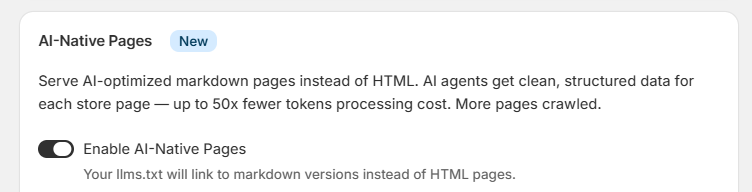
When AI-Native Pages is enabled, markdown endpoints are added to
llms.txtandllms-full.txtinstead of links to standard HTML pages. - Activate the extension in the Shopify Theme Editor.
-
- Open the Shopify Theme Editor.
- Activate the AI-Native Pages app embed.
- Save your theme changes.
When the theme extension is activated, a link to the corresponding markdown endpoint is added to the code of each store page. This helps AI crawlers and agents discover and process the markdown version of the page more efficiently, regardless of how they arrived at the page.
Analytics
The sidebar on the right shows the current data:
- Status — whether AI-Native Pages are enabled.
- Theme extension — whether the theme extension is active.
- Endpoints — total number of generated endpoints.
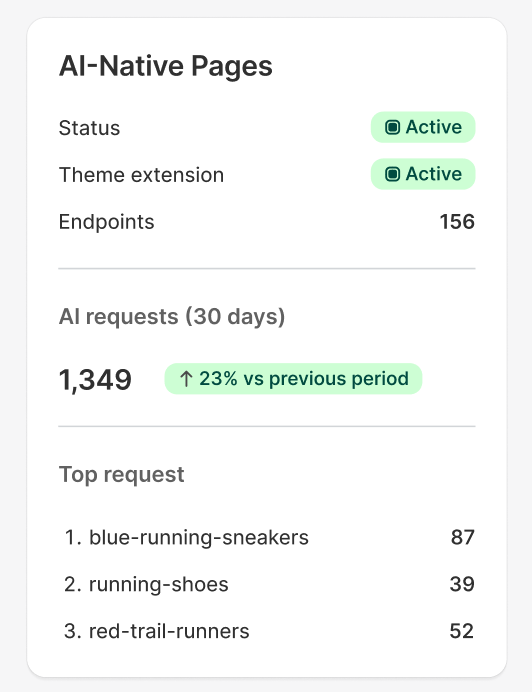
- AI requests (30 days) — total visits to AI-generated pages during the last 30 days.
- Top requests — most popular AI-generated page.
