
To provide relevant and up-to-date search results, Searchanise indexes the following data:
- products
- categories
- orders (to show bestselling product if needed)
- pages
- blog posts
Product and category changes are indexed automatically.
You’ll need to start the re-indexation manually to update the search results after you’ve:
- added, edited, or deleted pages, blog posts
- changed store currency formatting
- restored the search results page if you accidentally removed it
- changed the app integration for product reviews
- changed store URL settings
- changed customer groups settings
- changed price lists settings
To start the re-indexation, click the Force re-indexation button in the Searchanise control panel.
The indexation does not affect your website performance. Our search widgets also keep smooth functionality during the indexation.
Searchanise currently indexes up to 50 Customer groups per store to prevent indexation fail.
Set up the automatic re-indexation by schedule
To set up the automatic re-indexation, follow these steps:
- Go to the Searchanise control panel.
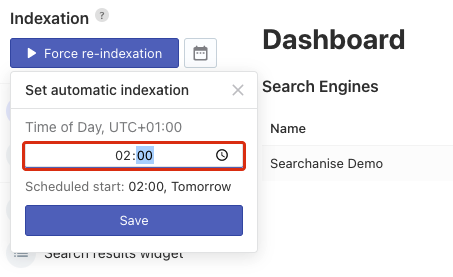
- Click the schedule button next to the Force re-indexation button on the left-hand bar.
- In the opened pop-up, set when you want your data to be updated.
 Important info
The time is in the time zone of your store.
- Save the changes.
That’s it. You can now see the date and time of the next re-indexation.
Remove the automatic re-indexation
To remove the automatic re-indexation, follow these steps:
- Go to the Searchanise Search & Filter control panel.
- Click the schedule button next to the Force re-indexation button on the left-hand side.
- In the pop-up that opens, click the Remove button.
That’s it. The re-indexation by schedule is removed. You can now start re-indexation manually only.
If you use BigCommerce Multi-Storefront, configure automatic reindexing separately for each storefront, as each app installation creates its own search engine.
