
If your Search Results page opens but shows no content, the Page section in your theme is likely hidden.
Why this happens
In Shopify themes, pages (including the Search Results page) rely on a Page section to display content.
If this section is hidden, the page will load but appear empty.
How to check
- Go to Shopify admin > Online store > Themes.
- Click Edit Theme.
- In the Theme Editor, find the page selector at the top.
- Navigate to Pages > Default page.
- Check the sections list on the left:
- If the Page section is visible, everything is fine.
- If the Page section is hidden, it needs to be visible.
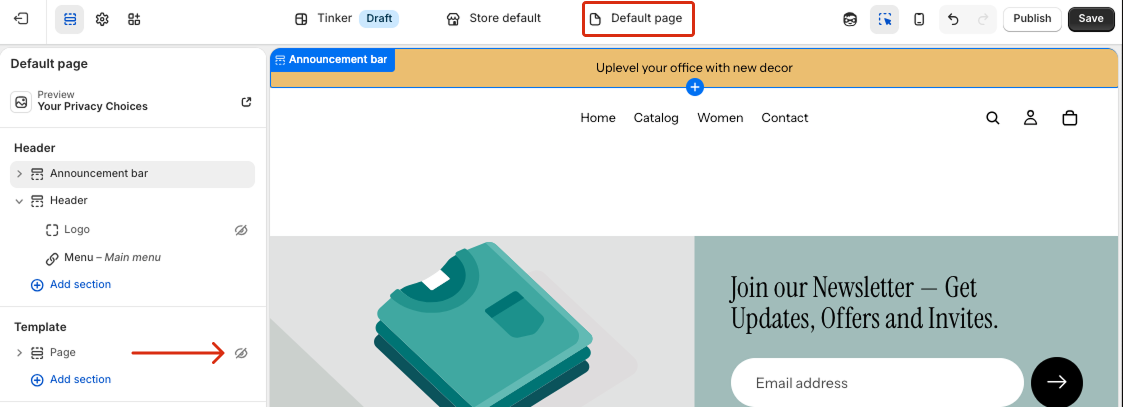
Solution 1: Enable the section
If the Page section is present but hidden:
- Enable on the Pages section in Templates.
- Save the changes.
The Search Results page should start displaying content.
Solution 2: Contact support
If the Page section is intentionally hidden (for example, due to theme customization) or if you are unsure how to enable it safely, contact our support team.
We will:
- Create a separate template for the Search Results page.
- Ensure it works correctly with your theme.
- Avoid affecting your existing layout and design.
