
This article is general for Shopify, BigCommerce, Wix, WooCommerce, Magento 1, and Magento 2.
If a filter contains many values, you can enable a search box inside the filter to help customers quickly find what they need.
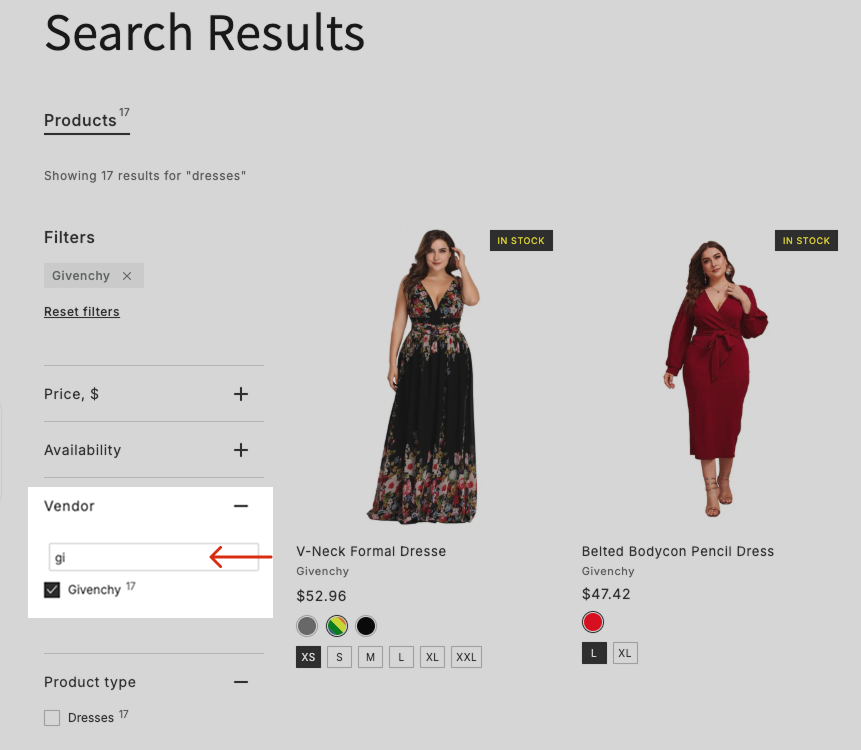
Enable the filter search box
-
Go to Searchanise Search & Filter admin panel > Filters > Filter list section> Settings tab.
-
Enable Show search bar in filters.
-
Adjust If filter values more than to set the minimum number of values required to display the search box.
-
Apply the changes.
That’s it. The search box will appear in filters that contain more values than the number you specified.
Customize the search box placeholder
To edit or translate the placeholder text:
- Go to Searchanise Search & Filter admin panel > Translations & Texts section> SRW tab > Messages part.
- Update the Filter search placeholder value.
- Apply the changes.
