
Installing Searchanise Product Reviews
To set up the Searchanise Product Reviews app, click Install on its page in the Shopify App Store and complete the installation process.
Activating the widgets
The app dashboard provides quick links to widget installation settings. You can use these links or navigate to the settings manually.
- Go to Theme Editor > App Embeds, enable the app embed, and save the changes.
- Go to Theme Editor > Product page > Template section (left sidebar) > Apps > Add block. In the Apps tab, select the Reviews widget, and save the changes.
- On the same product page in the Theme Editor, add the Rating widget and save the changes.
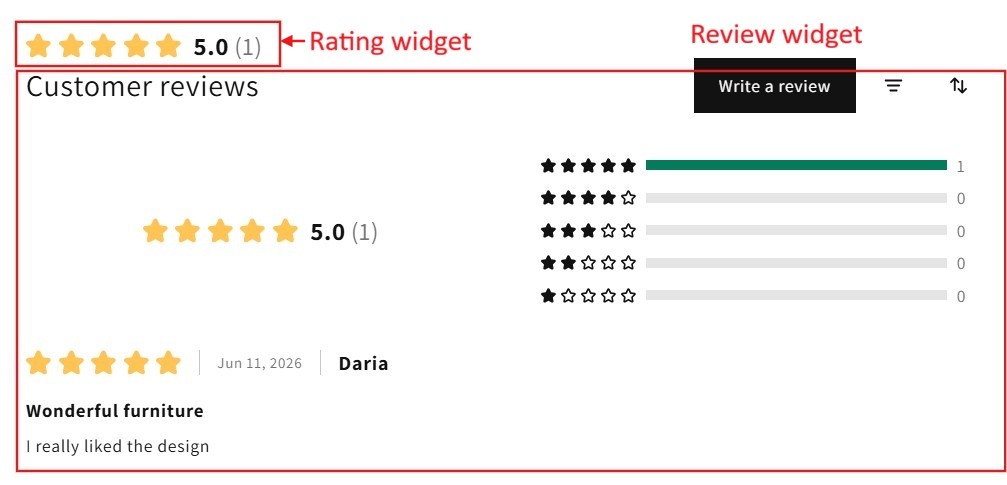
Once you complete the activation, the setup guide will no longer appear on the dashboard.
Using existing Shopify reviews
Searchanise Product Reviews uses Shopify’s standard product review metaobject to store review data.
If your store already has product reviews stored in Shopify review standard, these reviews will automatically become available in the Searchanise Product Reviews app. You don’t need to import or migrate them manually.
Collecting reviews
To configure automated review request emails, see this article.
Managing reviews
To manage customer reviews and replies, see this article.
Integrating with Searchanise Search & Filter
Searchanise Product Reviews integrates with the Searchanise Search & Filter app. To set up the integration:
- Install both apps.
- In the Searchanise Search & Filter admin panel, go to the Integrations > Product review.
- Set the toggle for Shopify standard toggle to On.
- Re-index your store by clicking the Force re-indexation button on the left-hand side of the Searchanise Search & Filter admin panel.
Product ratings will be displayed as stars in all Searchanise widgets, including the Instant search widget, Search results widget, and Recommendations. Customers can also sort and filter products by rating.
