
Personalization is available for Shopify (old plans), WooCommerce, Magento 1, Magento 2. Read more about Personalization
AI Personalization is available for Shopify, except on Legacy plans introduced before December 2022, and Wix. Read more about AI personalization on Wix.
Search Personalization means raising user-specific results and decreasing other ones. The user-specific results are based on the user’s search history: what a user searched and what he clicked on. Thus, it can help improve the customer experience in your store.
What is AI Personalization
AI Personalization means that your customers’ search results will be tailored based on their behavior (AI = Artificial Intelligence). It is an advanced version of the Personalization feature.
While Personalization analyzes only category and type of the products viewed or searched by customers, AI Personalization also tracks the following actions:
- products that were viewed or got quick views (at least 5 views were made)
- products added to cart (at least 2 products were added)
- products checked out (at least 1 product was bought)
- interest in particular brands (only for Shopify)
How AI Personalization works
If your store uses a cookie consent banner and a visitor declines marketing cookies, AI Personalization will not work for that visitor.
For example, your customer added a phone of a particular brand to cart or bought it. When they start to search for a phone case, they will first see cases of this brand. Thus, AI Personalization is based on both customers’ actions (view, add to cart or purchase) and product properties (brand, collection, and type).
Customizing AI Personalization
You can change the priority of customers’ actions that are considered for AI Personalization. There are 4 levels of priority:
- Low
- Medium
- High
- Very high
You can also choose what should be included in AI Personalization:
- Collection
- Brand (only for Shopify)
- Product Type
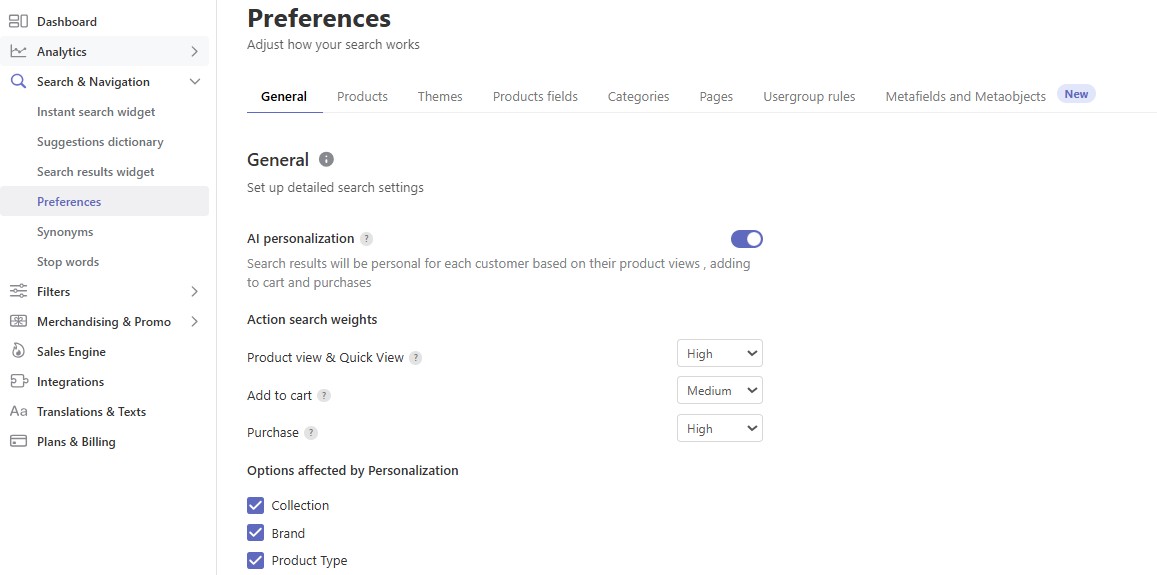
For example, if you select only Collection, customers’ search results will be based on their interest in particular Collection without any relation to what Brands they have viewed or searched for.
How to enable/disable the feature
AI Personalization is enabled by default.
To disable the feature, follow these steps:
- Go to the Searchanise Search & Filter control panel > Search & Navigation > Preferences section > General tab.
- Set the AI Personalization toggle to off.
- Apply the changes.
Product Merchandising settings have a higher priority than Personalization. For example, if you set up a product to be always at the top of the search results, it will be shown first and personalized suggestions will be displayed after that.
 | Personalization is the segmentation of customer behavior. Find out what other customer segmentation exists and how it can help your business. |
